We're excited to announce some refinements and enhancements that make the Erbium platform more powerful.
More User Friendly Form Menu
We have updated the Erbium platform to provide an easier way to interact with the system
We have replaced the slide-in / slide-out left menu with a horizontal menu that remains present on the the form editor.
For the most part, the functionality of the menu remains the same, with a few minor enhancements.
Below you will see the location of the new menu.
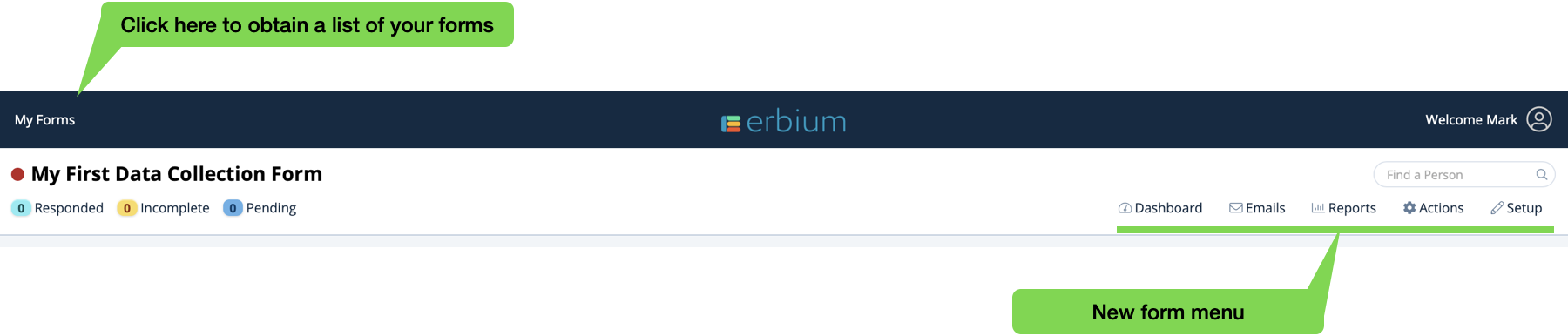
Understand the capabilities of the event menu and data collection form menu.
Improved! - Attendee Type Widget
Configure your event registration form to accommodate different Attendee Types for both primary registrants and guests. Simply drag this new Attendee Type widget from the widget palette onto the Registration Form:
To understand the capabilities of the Attendee Type widget click here.
New ! - Likert Scale Questions
Gathering consistent data through 5 point Likert Scales is now possible using the Likert Scale widget. Select a pre-configured response set that automatically provide the possible choices.
Look for this icon in the widget palette:
To understand the capabilities of the Likert Scale widget click here.
New! - Date of Birth Widget
The Data of Birth widget provides you with the ability to ask for a date of birth and automatically determine the age of the respondent calculated at one of the following:
- The date of registration
- A custom date
- The start date of the event (events only)
And, use the calculated age in rules that display other questions.
Look for this icon in the widget palette:
To understand the capabilities of the Date of Birth widget click here.
Included! - Post Event Surveys
Post event surveys enable you to poll event registrants after the event using a dedicated survey - adding responses to their original registrant record. And ... use rules based upon the original registration to only ask questions that are pertinent to the attendee.
To understand the capabilities of the Post Event Surveys click here.
Form Types
Going forward, when creating forms identify the purpose of the form to enable special features:
- Data Collection Form - can be used for collecting any type of data.
- Event Registration Form - specifically used for events, these forms are enabled for attendee types and post event surveys. First name. last name and email address are mandatory for event registration.
Comments
0 comments
Article is closed for comments.